Victron Opportunity Loads: beyond EV chargers and Shelly switches
Node-RED and S2 can bring suitable pumps, heaters and other AC equipment into Victron’s surplus-solar control. The control interface and feedback still matter.
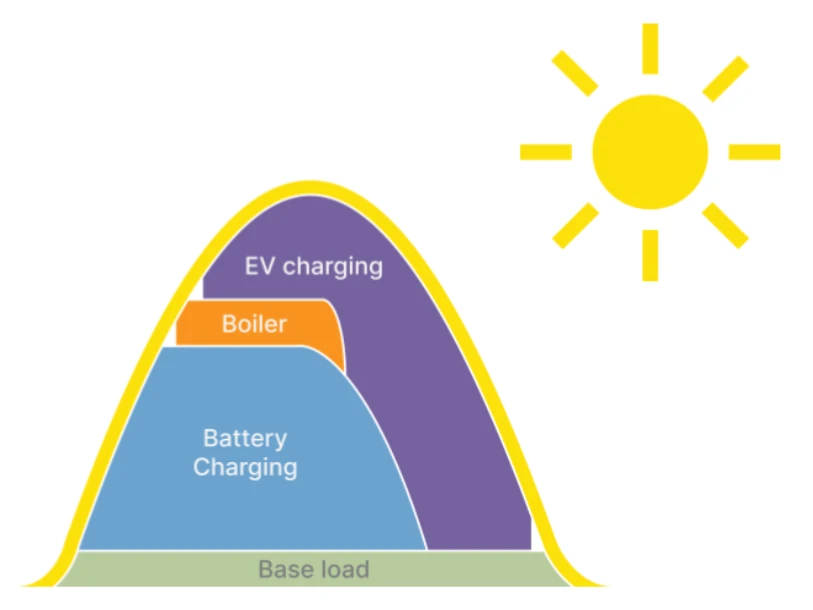
A geyser can store heat for later. A pool pump may be able to do some of its work while the sun is out. If useful jobs can move into the solar window, there is an opportunity to use more of the energy your system can produce.
GX Opportunity Loads arrived in Venus OS v3.80, announced on 22 September 2026. The GX coordinates flexible loads around the available solar energy. Victron EV Charging Stations and supported Shelly devices provide native routes into that control.
The interesting extension is Node-RED with node-red-contrib-s2. It opens the door to other suitable equipment, using a control interface the appliance already has or an appropriately designed switching arrangement.
What “anything” means in practice
You can represent many different devices to the GX without making each one speak Victron’s language itself. That is a much broader possibility than a list of supported smart-plug brands.
The equipment still needs to be controllable, and its work must tolerate being moved, reduced or interrupted. A pump with an accessible control input is a different project from an appliance that needs somebody to press Start after every power interruption. A relay alone does not solve that difference.
The current GX manual specifies AC loads; DC loads are outside the supported scope. Essential equipment that must remain available should not depend on a surplus-only operating window.
Keep the GX in charge of the available energy
This approach was explained in a beta-testing walkthrough by Victron developer Dirk-Jan Faber. S2 provides the conversation between the energy coordinator and a representation of each appliance, called a Resource Manager.
- The GX decides: Opportunity Loads coordinates the available power and device priorities.
- The S2 resource translates: a Node-RED resource describes the appliance’s operating modes and receives the selected mode.
- The flow acts and reports back: the integration controls the real equipment and returns its state and power information.
This keeps the surplus decision in one place. An installer does not need to build a competing solar-surplus calculation for every pump or heater.
How another load joins the system
A starting point is the s2-resource node from the S2 palette. For Node-RED running on the GX, the recommended connection is its built-in D-Bus transport. The resulting virtual device represents the actual AC load or heat pump.
The control method is Operation Mode Based Control. A simple appliance might have Off and On states, with an expected power demand for each. More capable equipment can expose additional levels or a variable setting. An ordinary relay still provides on/off control.
Configure a separate resource for each load, the correct phase and connection position, credible power values and appropriate minimum durations. The output must then be connected to the real control path: for example a local device API, a suitable relay interface or a supported equipment protocol. Installing the palette does not automatically create that connection.
Three practical opportunities
- Water heating: a geyser element can be a flexible load through a correctly rated switching arrangement. Its thermostat and thermal protection remain part of the installation.
- Pool or transfer pumping: a suitable pump can use daytime solar, provided minimum run/rest times, water availability and the required daily work are addressed.
- A controllable heat pump: an approved enable input or equipment interface may provide a better control path than repeatedly cutting its mains supply. Follow the appliance manufacturer’s requirements.
These are design possibilities. Before selecting equipment, establish how the particular appliance starts, stops and reports its condition. Mains switching needs suitable hardware and qualified installation.
A command is only the start of the conversation
Sending On does not prove that a relay closed, a pump started or a heater drew power. Where state feedback is available, return the equipment’s actual state to the S2 resource as ModeConfirmation. That gives the resource information from the equipment rather than simply assuming the command succeeded.
The palette documentation also distinguishes power reporting from control. Actual readings in watts are useful evidence. The software can construct a reported value from the requested operating level, but that is an estimate of what was instructed, not an independent measurement.
Our practical advice is to identify those assumptions when commissioning the system. Test a failed command and an unavailable reading as well as a normal sunny-day start.
Check the system before building the flow
Opportunity Loads needs Venus OS 3.80 or later, the New UI, a supported Victron inverter/charger and GX, battery state-of-charge information, and monitoring of all PV production. Priorities can place loads ahead of or behind battery charging. Brief battery use can occur when solar changes or a load must complete its minimum run time; surplus control is not a promise of zero battery use.
Dynamic ESS and Opportunity Loads are currently mutually exclusive. Victron’s GX interface implementation prevents enabling Opportunity Loads while Dynamic ESS is active. Check that choice before changing an existing system.
For Node-RED on the GX, check the device’s compatibility with Venus OS Large, which adds Node-RED. The S2 palette has its own requirements and update cycle. Back up the flows and record the versions you commissioned. Custom Node-RED functionality also needs an agreed maintenance and support arrangement; Victron distinguishes it from standard product support.
Design for a cloudy day and a lost connection
Decide what happens when there is too little solar, the GX restarts or communication with the appliance fails. A selected default mode in software is not a guarantee that the physical equipment has switched off. Keep the appliance’s local protections independent of the automation, and test recovery before leaving it unattended.
If hot water or pumping must be completed every day, plan how that requirement is met when surplus solar is unavailable. Opportunity Loads can help with energy timing; it does not remove the underlying job.
Start with the simplest integration that meets the requirement. Tell our Ballito team your GX model, firmware, load rating, existing controls and required operating hours. We can help assess the equipment and control approach before you buy parts. For the background on curtailed solar, see why solar output can fall when the battery is full.
Sources & further reading
Technical guidance and manufacturer documents for the equipment and principles discussed here. Use the documentation for your exact model and system.
- Victron Professional — Venus OS v3.80 launch, 22 September 2026
- GX Opportunity Loads manual — supported systems, AC loads, priorities and operation
- node-red-contrib-s2 — palette documentation, examples and power reporting
- Victron Energy — S2 Node-RED source and current development
- Venus OS Large — Node-RED compatibility, backups and support scope
- Victron GX interface — Dynamic ESS and Opportunity Loads enablement guard